Ingest New Atmospheric Models into SEDA
Tutorial to show how users can use models not in the list of available models.
[1]:
import seda
import pickle
import numpy as np
import os
import json
import importlib
import fnmatch
import matplotlib.pyplot as plt
import shutil
from importlib import resources
from seda.models_aux._plugin_helpers import export_plugin_function
from pathlib import Path
SEDA v0.8.0 package imported
Available models:
[2]:
seda.models.Models().available_models
[2]:
['SM08',
 'BT-Settl',
 'Sonora_Diamondback',
 'LB23',
 'Sonora_Cholla',
 'ATMO2020',
 'Sonora_Bobcat',
 'Sonora_Elf_Owl']
If the models you are interested in are not listed above, you can add new models by following the steps outlined in the tutorial.
As an example, this tutorial explains how ATMO 2020 models were ingested.
1. Create config.json File
First, create a JSON file containing the basic information for the models. This file will be used throughout the code and accessed via various attributes of seda.models.Models(). To do this, define a dictionary with the required parameters by following the script below, modifying only the lines marked with the comment “fill out accordingly”.
Then, save the dictionary in the directory models_aux/MY_MODEL, where MY_MODEL matches the model name specified below. The folder will be created if it does not already exist and will be used to store all files and materials related to the new model.
The JSON file should be saved with the name config.json:
[3]:
data = {
    "_comment_model": "Internal label for the atmospheric models",
    "model": "ATMO2020", # fill out accordingly
    "_comment_ref": "Reference for the models (optional)",
    "ref": "Phillips et al. (2020)", # fill out accordingly
    "_comment_name": "Name of the models (optional)",
    "name": "ATMO 2020", # fill out accordingly
    "_comment_bibcode": "bibcode identifier for the models (optional)",
    "bibcode": "2020A%26A...637A..38P", # fill out accordingly
    "_comment_ADS": "ADS links to the model publication (optional)",
    "ADS": "https://ui.adsabs.harvard.edu/abs/2020A%26A...637A..38P/abstract", # fill out accordingly
    "_comment_download": "Link to download the models (optional)",
    "download": "https://noctis.erc-atmo.eu/fsdownload/zyU96xA6o/phillips2020", # fill out accordingly
    "_comment_filename_pattern": "Common pattern recognized in all spectra filenames used to select only spectra files in case there are other files in the same directory",
    "filename_pattern": "spec_T*.txt", # fill out accordingly
    "_comment_filename_trim": "Indices [start, end] to trim start/end of filenames for plot labels; use null for start or end of string",
    "filename_trim": [5, -4], # fill out accordingly
    "_comment_free_params": "Free parameters in the models",
    "free_params": ["Teff", "logg", "logKzz"] # fill out accordingly
}

# file path to save the JSON file
models_aux = resources.files('seda.models_aux')
model = data['model']
path = models_aux / model

# check whether the directory exist, and if not create it
if not os.path.exists(path):
    os.makedirs(path)

# file name
file = 'config.json'

# write the dictionary to a JSON file
with open(path/file, 'w') as json_file:
    json.dump(data, json_file, indent=4)

print(f"JSON file '{file}' created successfully.")
JSON file 'config.json' created successfully.
2. Define _read_model_spectrum Function
Next, define a function (_read_model_spectrum) that reads an example model spectrum and returns a dictionary containing:
The wavelength (
wl_model) expressed in microns.The flux (
flux_model) expressed in units of erg/s/cm2/A.
[4]:
from astropy.io import ascii
import astropy.units as u
from seda.models_aux._plugin_helpers import _vac_to_air_uv_safe

def _read_model_spectrum(spectrum_file):
    """
    Read a model spectrum and return wavelength wavelength (micron) and flux (erg/s/cm2/A).
    """

    spec = ascii.read(spectrum_file, format='no_header')

    wl_model = spec['col1'] * u.micron # um (in vacuum)
    wl_model = _vac_to_air_uv_safe(wl_model).value # um in the air

    flux_model = spec['col2'] * u.W/u.m**2/u.micron # W/m2/micron
    flux_model = flux_model.to(u.erg/u.s/u.cm**2/(u.nm*0.1)).value # erg/s/cm2/A

    out = {'wl_model': wl_model, 'flux_model': flux_model}

    return out
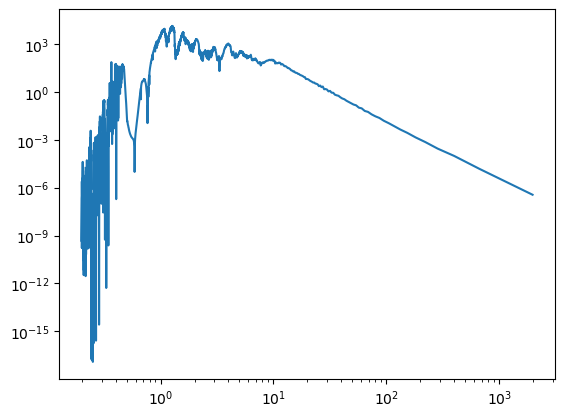
Test the function _read_model_spectrum with an example spectrum
[5]:
spectra_dir = '/home/gsuarez/TRABAJO/MODELS/atmosphere_models/ATMO2020/atmosphere_models/NEQ_weak_spectra/'
example_spectrum_file = 'spec_T1000_lg4.0_NEQ_weak.txt'
example_spectrum_path = spectra_dir + example_spectrum_file
spectrum_data = _read_model_spectrum(example_spectrum_path)
plt.plot(spectrum_data['wl_model'], spectrum_data['flux_model'])

plt.xscale('log')
plt.yscale('log')
3. Define _separate_params Function
Define a function (_separate_params) that extracts the free parameters for each spectrum directly from the file names. A parameter must be extracted for each parameter in free_params specified in the previously created dictionary.
NOTE: The returned parameter dictionary does not need to preserve the order defined in free_params.
[6]:
import numpy as np

def _separate_params(filenames):
    """
    Parse filenames to extract model parameters as arrays.
    """

    # free parameters
    Teff = np.zeros(len(filenames)) * np.nan
    logg = np.zeros(len(filenames)) * np.nan
    logKzz = np.zeros(len(filenames)) * np.nan

    # separate parameters
    for i,name in enumerate(filenames):
        s = name.split('spec_')[1]

        # Teff
        Teff[i] = float(s.split('_')[0][1:])
        # logg
        logg[i] = float(s.split('_')[1][2:])
        # logKzz
        if (s.split('lg')[1][4:-4]=='NEQ_weak'): # when the grid is NEQ_weak
            logKzz[i] = 4
        elif (s.split('lg')[1][4:-4]=='NEQ_strong'): # when the grid is NEQ_strong
            logKzz[i] = 6
        else: # equilibrium chemistry grid (CEQ)
            logKzz[i] = 0

    # output dictionary with parameters
    out = {'Teff': Teff, 'logg': logg, 'logKzz': logKzz}

    return out
Test the function _separate_params with an example filenames:
[7]:
filenames = ['spec_T1500_lg4.0_CEQ.txt', 'spec_T500_lg5.5_NEQ_weak.txt', 'spec_T1400_lg2.5_NEQ_strong.txt']
_separate_params(filenames)
[7]:
{'Teff': array([1500.,  500., 1400.]),
 'logg': array([4. , 5.5, 2.5]),
 'logKzz': array([0., 4., 6.])}
Once the functions _read_model_spectrum and _separate_params are implemented, run the script below to save them in the file plugin.py inside models_aux/MY_MODEL. If plugin.py already exists, it will be overwritten.
[8]:
# full path to the plugin.py file for the current model
plugin_path = models_aux / model / 'plugin.py'

# header with imports required by the plugin functions
header = '\n'.join([
    'from astropy.io import ascii',
    'import astropy.units as u',
    'import numpy as np',
    'from seda.models_aux._plugin_helpers import _vac_to_air_uv_safe',
]) + '\n'

# write/overwrite plugin.py with both functions and the header
export_plugin_function(plugin_path, [_read_model_spectrum, _separate_params], header=header)
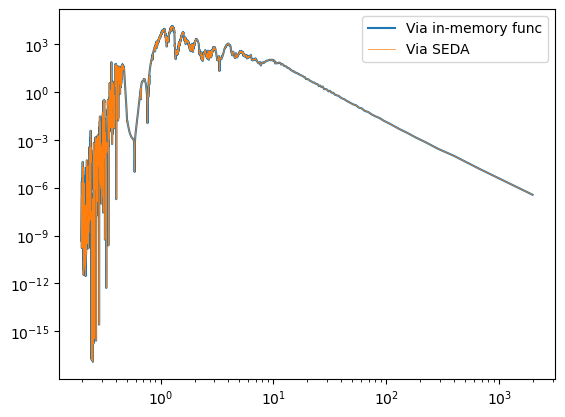
Double check the functions are accessible through the code.
Function read_model_spectrum to read the spectra:
[9]:
out_spectrum = seda.models.read_model_spectrum(spectrum_name_full=example_spectrum_path, model=model)

plt.plot(spectrum_data['wl_model'], spectrum_data['flux_model'], label='Via in-memory func')
plt.plot(out_spectrum['wl_model'], out_spectrum['flux_model'], linewidth=0.5, label='Via SEDA')

plt.legend()
plt.xscale('log')
plt.yscale('log')
Function separate_params to extract parameters:
[10]:
filenames = ['spec_T1500_lg4.0_CEQ.txt', 'spec_T500_lg5.5_NEQ_weak.txt', 'spec_T1400_lg2.5_NEQ_strong.txt']
seda.models.separate_params(model=model, spectra_name=filenames)
[10]:
{'spectra_name': ['spec_T1500_lg4.0_CEQ.txt',
  'spec_T500_lg5.5_NEQ_weak.txt',
  'spec_T1400_lg2.5_NEQ_strong.txt'],
 'params': {'Teff': array([1500.,  500., 1400.]),
  'logg': array([4. , 5.5, 2.5]),
  'logKzz': array([0., 4., 6.])}}
4. Create coverage.pickle File
Now, let’s create a coverage.pickle file in the directory models_aux/MY_MODEL. This file stores the full coverage of each free parameter in the model grid.
It enables the use of functions such as seda.models.Models(model) and seda.plots.plot_model_coverage.
To generate this file, simply update the path in the script below so that it points to the location of the new models.
[11]:
model_dir = ['/home/gsuarez/TRABAJO/MODELS/atmosphere_models/ATMO2020/atmosphere_models/CEQ_spectra/',
             '/home/gsuarez/TRABAJO/MODELS/atmosphere_models/ATMO2020/atmosphere_models/NEQ_weak_spectra/',
             '/home/gsuarez/TRABAJO/MODELS/atmosphere_models/ATMO2020/atmosphere_models/NEQ_strong_spectra/',
            ]

# extract parameters from the dictionary for the JSON file
filename_pattern = data['filename_pattern']
# file path to save the pickle file
out_file = models_aux / model / 'coverage.pickle'

# extract and save the values for all the model free parameters with spectra in the indicated directory
out = seda.utils.select_model_spectra(model=model, model_dir=model_dir, out_file=out_file,
                                       filename_pattern=filename_pattern, save_results=True)
      510 model spectra
/home/gsuarez/TRABAJO/PROGRAMS/Python/bin/seda/seda/models_aux/ATMO2020/coverage.pickle saved successfully
Now we can explore the object ``seda.models.Models(MY_MODEL)``.
All the attributes are:
[12]:
seda.models.Models(model).get_parameters().keys()
[12]:
dict_keys(['path_models_aux', 'available_models', 'model', 'ref', 'name', 'bibcode', 'ADS', 'download', 'filename_pattern', 'free_params', 'params', 'params_unique'])
Accessing a few parameters:
[13]:
# unique free parameter values
seda.models.Models(model).params_unique
[13]:
{'Teff': array([ 200.,  250.,  300.,  350.,  400.,  450.,  500.,  550.,  600.,
         700.,  800.,  900., 1000., 1100., 1200., 1300., 1400., 1500.,
        1600., 1700., 1800., 1900., 2000., 2100., 2200., 2300., 2400.,
        2500., 2600., 2700., 2800., 2900., 3000.]),
 'logg': array([2.5, 3. , 3.5, 4. , 4.5, 5. , 5.5]),
 'logKzz': array([0., 4., 6.])}
[14]:
# publication reference
seda.models.Models(model).ADS
[14]:
'https://ui.adsabs.harvard.edu/abs/2020A%26A...637A..38P/abstract'
Inspect new atmospheric models
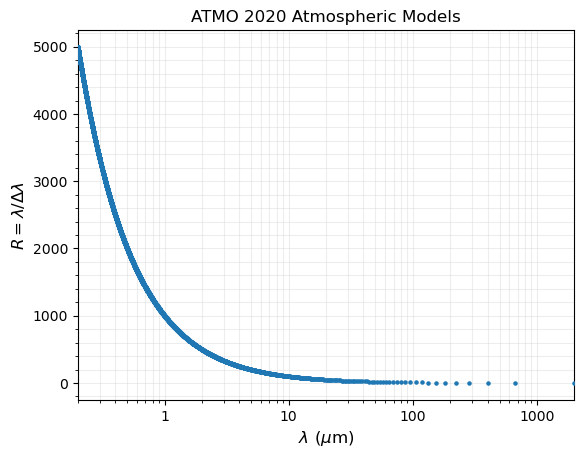
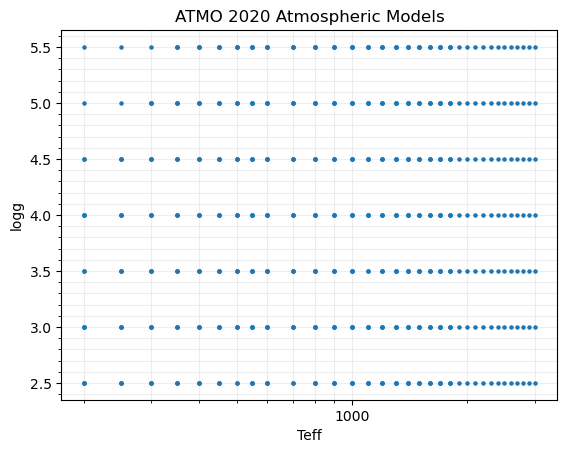
We can use seda.plots.plot_model_coverage to inspect the coverage and resolution of model spectra, as explained in this tutorial.
As an example, let’s plot the coverage of logg vs. Teff (two common free parameters in atmospheric models):
[15]:
xparam = 'Teff'
yparam = 'logg'
fig, ax = seda.plots.plot_model_coverage(model=model, xparam=xparam,
                                         yparam=yparam, xlog=True)
5. Copy an Example Model Spectrum.
In order to inspect the resolution of model spectra, it is convenient to provide through the code an example model spectrum that will be use to estimate the resolution of the models.
[16]:
# copy the spectrum to models_aux/MY_MODEL
_ = shutil.copy2(example_spectrum_path, models_aux / model / example_spectrum_file)
Plot resolution of example spectrum:
[17]:
spectra_name_full = str(models_aux / model / example_spectrum_file)

fig, ax = seda.plots.plot_model_resolution(model=model, spectra_name_full=spectra_name_full)