Nested sampling for a single observed spectrum
Forward modeling of a brown dwarf spectrum using the dynesty Bayesian framework and modern atmospheric models.
[1]:
import seda # import the seda package
import importlib
import numpy as np
import pickle
import os
from dynesty import plotting as dyplot # to plot nested sampling results
from astropy.io import fits, ascii
SEDA v0.5.6.dev3 package imported
Read the spectrum
As an example here, let’s read the near-infrared IRTF/SpeX spectrum for the T8 (~750 K) brown dwarf 2MASS J04151954-0935066 in Burgasser et al. (2004):
[2]:
# path to the seda package
path_seda = os.path.dirname(os.path.dirname(seda.__file__))

# SpeX spectrum
SpeX_name = path_seda+'/docs/notebooks/data/0415-0935_IRTF_SpeX.dat'
SpeX = ascii.read(SpeX_name)
wl_SpeX = SpeX['wl(um)'] # um
flux_SpeX = SpeX['flux(erg/s/cm2/A)'] # erg/s/cm2/A
eflux_SpeX = SpeX['eflux(erg/s/cm2/A)'] # erg/s/cm2/A
Load input data
Look at the input parameters here.
For any SEDA function, we can also see the function description directly on the notebook with the command help(), e.g.:
help(seda.input_parameters.InputData)
[3]:
# input spectrum
wl_spectra = wl_SpeX
flux_spectra = flux_SpeX
eflux_spectra = eflux_SpeX
# specify flux units
flux_unit = 'erg/s/cm2/A'

# resolution of input spectrum (used to convolve the model spectra)
res = 100

# distance to the target (optional and used to derive a radius)
distance = 5.71 # pc (parallax=175.2+-1.7; Dupuy-Liu2012)
edistance = 0.06 # pc

# load all the input data parameters
my_data = seda.input_parameters.InputData(wl_spectra=wl_spectra, flux_spectra=flux_spectra,
                                          eflux_spectra=eflux_spectra, flux_unit=flux_unit,
                                          res=res, distance=distance, edistance=edistance)
   Input data loaded successfully:
      1 spectra
Download (if not yet) the atmospheric models you want to use.
Use the commands below to see the available atmospheric models, the links to download them, and other relevant information from models. You can read more about the model here.
Also consider this tutorial to explore the free parameters in the models and their coverage.
[4]:
# available atmospheric models
seda.models.Models().available_models
[4]:
['BT-Settl',
 'ATMO2020',
 'Sonora_Elf_Owl',
 'SM08',
 'Sonora_Bobcat',
 'Sonora_Diamondback',
 'Sonora_Cholla',
 'LB23']
[5]:
# some parameters of interest from a selected model
model = 'ATMO2020'
print(seda.models.Models(model).ref) # reference
print(seda.models.Models(model).ADS) # link to paper
print(seda.models.Models(model).download) # link to download the models
seda.models.Models(model).params_unique # coverage of free parameters in the grid
Phillips et al. (2020)
https://ui.adsabs.harvard.edu/abs/2020A%26A...637A..38P/abstract
https://noctis.erc-atmo.eu/fsdownload/zyU96xA6o/phillips2020
[5]:
{'Teff': array([ 200.,  250.,  300.,  350.,  400.,  450.,  500.,  550.,  600.,
         700.,  800.,  900., 1000., 1100., 1200., 1300., 1400., 1500.,
        1600., 1700., 1800., 1900., 2000., 2100., 2200., 2300., 2400.,
        2500., 2600., 2700., 2800., 2900., 3000.]),
 'logg': array([2.5, 3. , 3.5, 4. , 4.5, 5. , 5.5]),
 'logKzz': array([0., 4., 6.])}
Load model grid options
Look at the input parameters here.
[6]:
# select the atmospheric models of interest
model = 'ATMO2020'

# path to the directory or directories containing the model spectra
# (update it to your own path)
my_path = '/home/gsuarez/TRABAJO/MODELS/atmosphere_models/ATMO2020/atmosphere_models/'
model_dir = [my_path+'CEQ_spectra/',
             my_path+'NEQ_weak_spectra/',
             my_path+'NEQ_strong_spectra/',
            ]

# set parameter ranges to select a grid subset and to be used as uniform priors
# when a free parameter range is not specified, the whole grid range will be explored
params_ranges = {
    'Teff': [700, 900], # Teff range
    'logg': [4.0, 5.0] # logg range
}

# load model options
my_model = seda.input_parameters.ModelOptions(model=model, model_dir=model_dir,
                                              params_ranges=params_ranges)
Model options loaded successfully
Tip: If you plan to model several spectra from the same instrument (same resolution), you can save the convolved model spectra to reuse them and do subsequent fits much faster. For this, set the parameter path_save_spectra_conv in seda.ModelOptions above to a folder path where you want to store the convolved spectra. Once the spectra are stored, the next time you run the code just replace model_dir by the path you used in path_save_spectra_conv and set
skip_convolution=True to avoid the model convolution. This was implemented thanks to issue.
Load Bayes fit options
Look at the input parameters here.
Consider the default full wavelength range of the input spectrum for the fits. Otherwise, we can use the parameter fit_wl_range to set a different fit range.
[7]:
# choose a filename (optional) to save the sampling results as a pickle file
# it is convenient to set a non-default name when running
# the code several times in the same folder to avoid overwriting results
bayes_pickle_file = f'{model}_bayesian_sampling_single_spectrum.pickle'

# radius range for the sampling
R_range = np.array((0.6, 1.0)) # Rjup

# load Bayesian fit options
my_bayes = seda.input_parameters.BayesOptions(my_data=my_data, my_model=my_model, R_range=R_range,
                                              bayes_pickle_file=bayes_pickle_file)
For input spectrum 1 of 1

      27 model spectra selected with:
         Teff range = [700, 900]
         logg range = [4.0, 5.0]
      elapsed time: 0.0 s

   Bayes fit options loaded successfully
Run nested sampling
[8]:
out_bayes = seda.bayes_fit.bayes(my_bayes)
   Estimate Bayesian posteriors

      Uniform priors:
         Teff range = [700. 900.]
         logg range = [4. 5.]
         logKzz range = [0. 6.]
         R range = [0.6 1. ]

   Starting dynesty...
20772it [00:43, 482.13it/s, batch: 7 | bound: 6 | nc: 1 | ncall: 59903 | eff(%): 34.588 | loglstar: 3991.108 < 3996.931 < 3996.219 | logz: 3978.267 +/- 0.117 | stop: 0.853]
      Bayesian sampling results saved successfully

   Bayesian sampling ran successfully
      elapsed time: 43.0 s
Plot results
The out_bayes output above from seda.bayes_fit.bayes is the input file to make plots.
If out_bayes is not in memory (if we reloaded the notebook or restarted the kernel), we need to open the pickle file first as below.
[2]:
# open the pickle file
bayes_pickle_file = 'ATMO2020_bayesian_sampling_single_spectrum.pickle'
with open(bayes_pickle_file, 'rb') as file:
    out_bayes = pickle.load(file)

print('Posteriors loaded successfully')
Posteriors loaded successfully
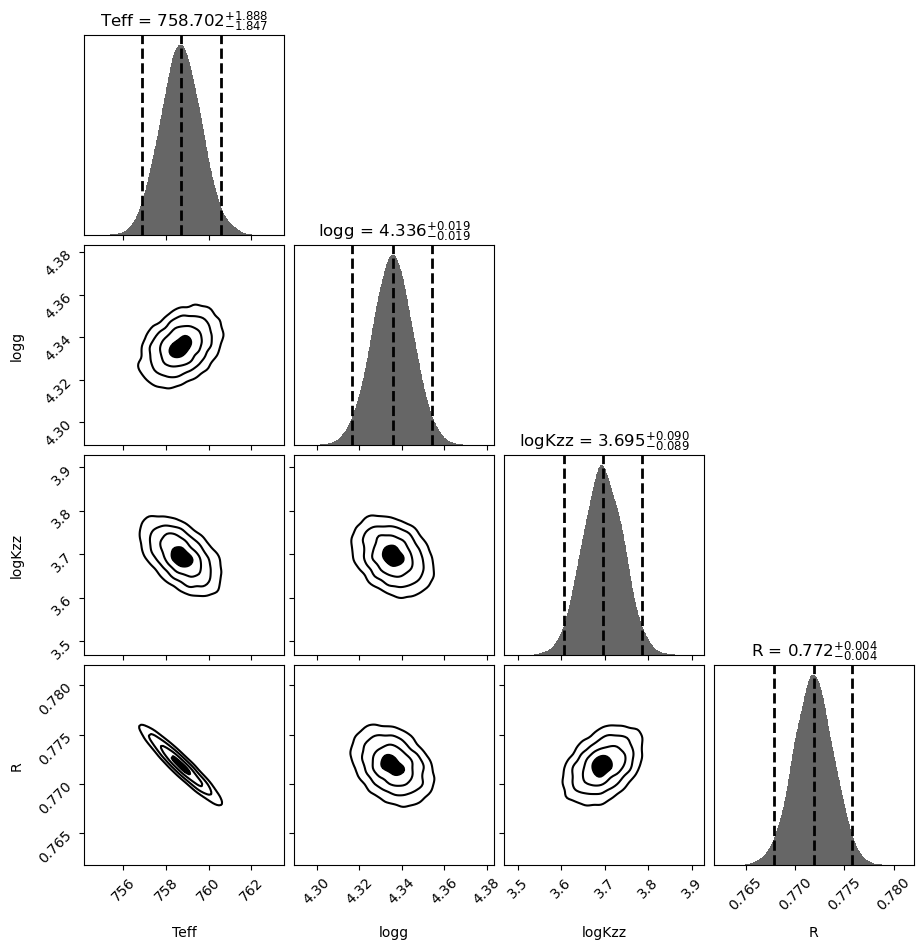
Make corner plot using dynesty tools
[3]:
# plot the 2-D marginalized posteriors.
labels = list(out_bayes['my_bayes'].params_priors.keys())
fig, axes = dyplot.cornerplot(out_bayes['out_dynesty'], show_titles=True, verbose='true',
                              title_fmt='.3f', title_kwargs={'y': 1.0}, labels=labels)
Quantiles:
Teff [(0.025, 756.8547252267668), (0.5, 758.7022068111715), (0.975, 760.590487740863)]
Quantiles:
logg [(0.025, 4.316768531394325), (0.5, 4.335727088764653), (0.975, 4.35438190995401)]
Quantiles:
logKzz [(0.025, 3.606608844027474), (0.5, 3.695487994673726), (0.975, 3.7851035259049612)]
Quantiles:
R [(0.025, 0.7678997033693918), (0.5, 0.771869030398781), (0.975, 0.7757633435849326)]
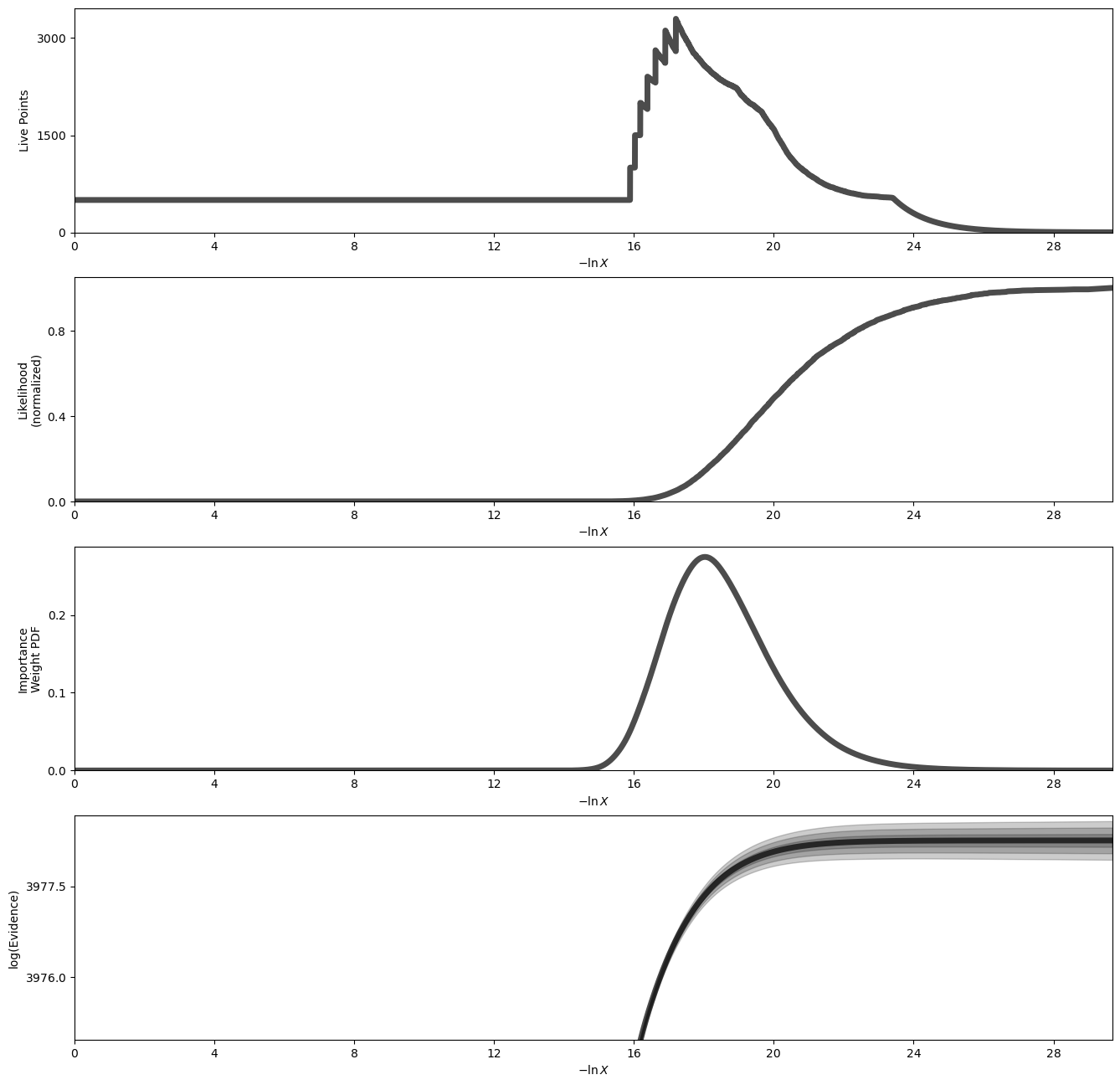
Plot a summary of the run
[4]:
fig, axes = dyplot.runplot(out_bayes['out_dynesty'], color='black', mark_final_live=False, logplot=True)
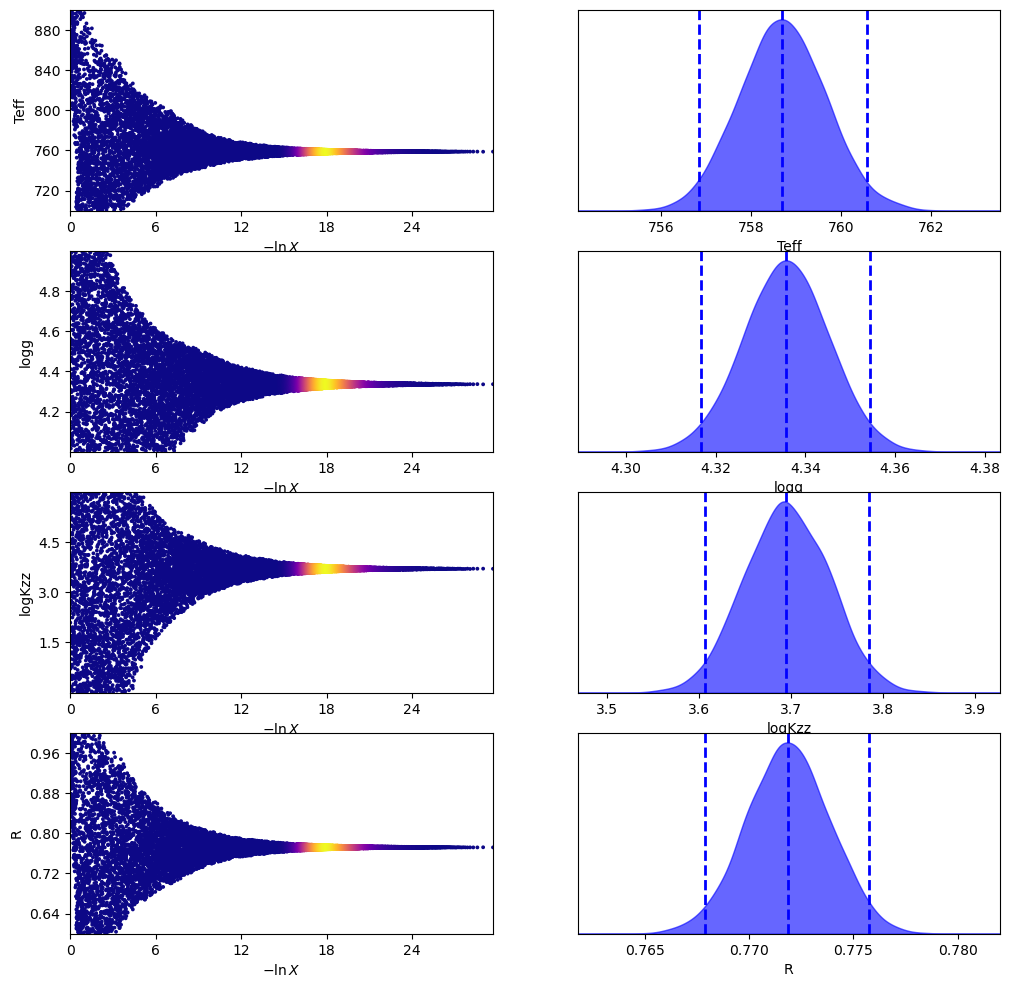
Plot traces and 1-D marginalized posteriors
[5]:
fig, axes = dyplot.traceplot(out_bayes['out_dynesty'], labels=labels)
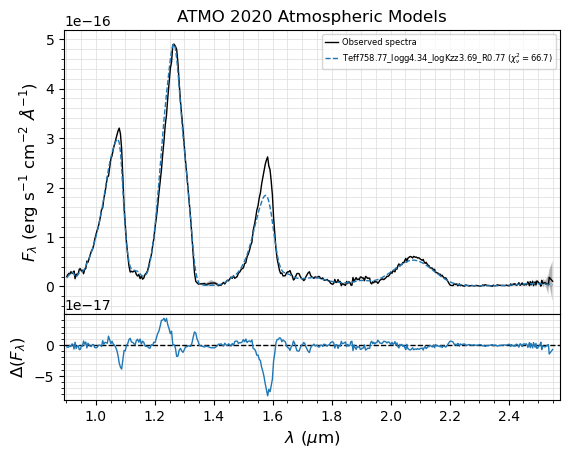
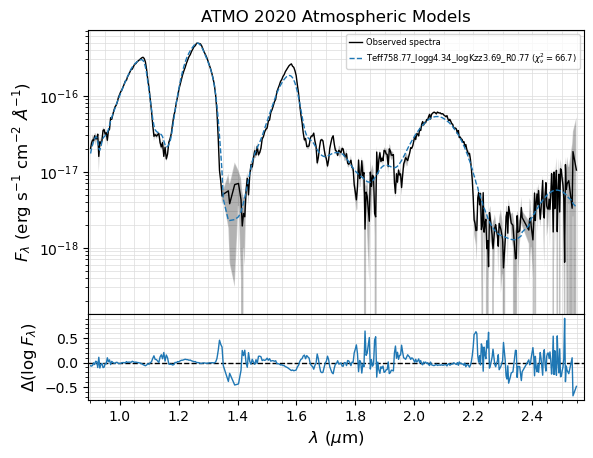
Plot the model spectrum using the median posterior parameters
SED with the best model fit from the Bayesian sampling.
The pickle file generated by seda.bayes_fit.bayes and stored with the name my_bayes.bayes_pickle_file is the input file to make plots. We can provide the name by either using my_bayes.bayes_pickle_file (if my_bayes is in memory) or just typing it.
The best model fit will be generated by interpolating into a model grid subset around the median posteriors.
[6]:
# using default logarithmic scale for fluxes
fig, ax = seda.plots.plot_bayes_fit(bayes_pickle_file)
For input spectrum 1 of 1

      8 model spectra selected with:
         Teff range = [700. 800.]
         logg range = [4.  4.5]
         logKzz range = [0. 4.]
elapsed time: 0.0 s
[7]:
# considering fluxes in linear scale
fig, ax = seda.plots.plot_bayes_fit(bayes_pickle_file, ylog=False)
For input spectrum 1 of 1

      8 model spectra selected with:
         Teff range = [700. 800.]
         logg range = [4.  4.5]
         logKzz range = [0. 4.]
elapsed time: 0.0 s